
There was nowhere to order.
Customers and partners had no Salesforce-based storefront to buy from.
Security Technology · Salesforce B2B Commerce
NITOR sells physical security and surveillance products, and plenty of those sales come through partners. Now partners can order for their customers, customers can buy on their own, and every order lands in QuickBooks Online.
one branded place for partners and customers to start an order
approved reps buy on a customer's behalf, with role-based access
accessories and replacement parts bought online
prompts for managed services and related items
synced both ways through MuleSoft
NITOR works in physical security and surveillance, and a lot of its business moves through partners, including Verkada reps. The company had just gone live on Salesforce, and quoting was already set up. Buying was the hard part. Small purchases like accessories and replacement parts still needed a sales rep or a manual step, and some orders had to be finished in the Verkada store.
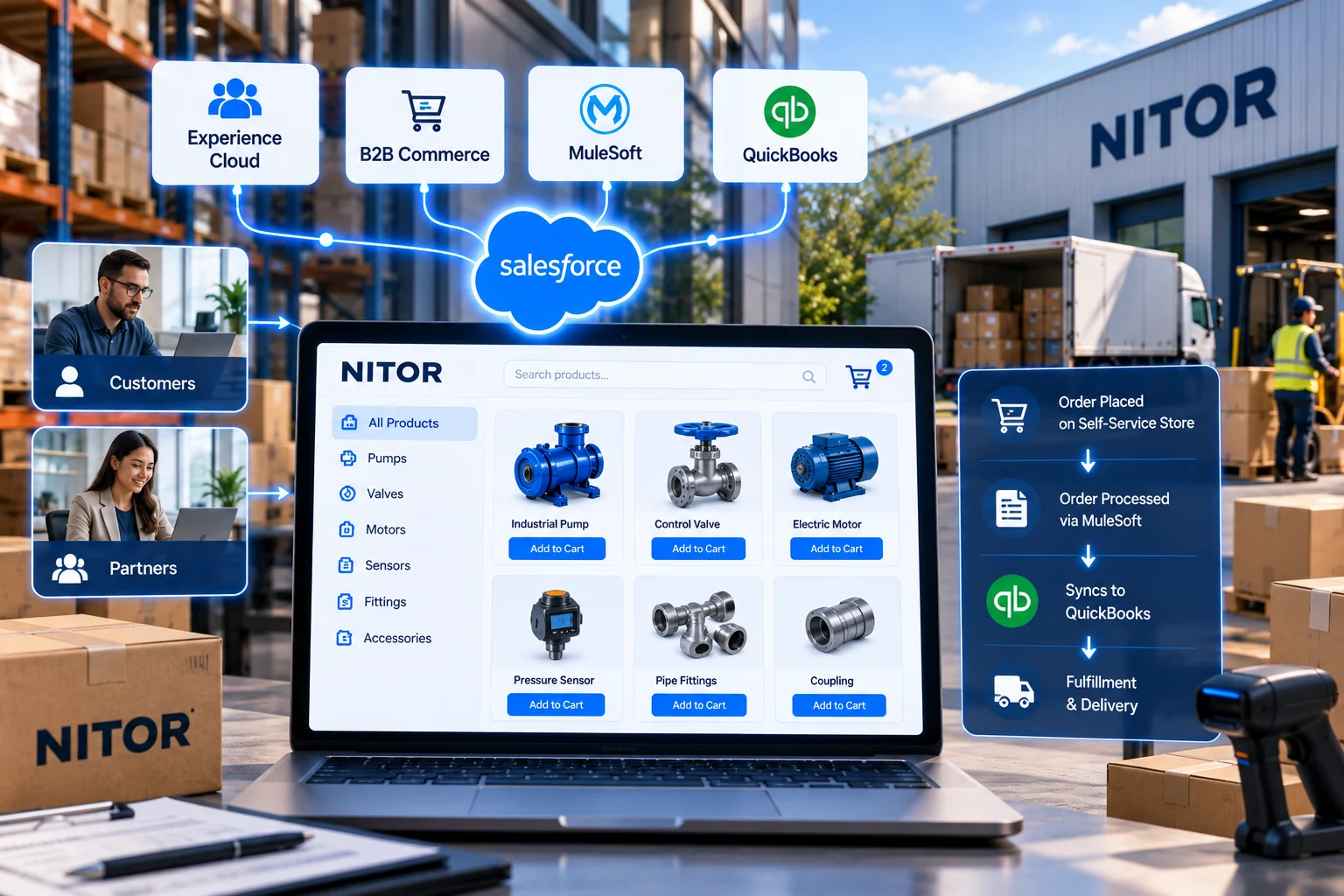
Stack Intelligence built a NITOR-branded storefront on Salesforce Experience Cloud and B2B Commerce. Partners can order on behalf of customers, customers can buy for themselves, and orders sync with QuickBooks Online through MuleSoft.
NITOR's Salesforce setup already handled quotes, with price books in place and PandaDoc for documents. Trouble started once someone was ready to buy.
We kept phase one tight. NITOR needed a storefront that could launch and start paying off even without a direct Verkada API. AI recommendations, deeper automation, and live inventory were saved for later phases.
We interviewed stakeholders, mapped how ordering worked at the time, and planned each integration before any build started.
We set up the storefront, access rules, catalog, and checkout first. Payments, tax, and QuickBooks Online were connected after that.
Our builders ran functional tests, then NITOR's team reviewed each deliverable over up to two rounds of feedback. NITOR got four end-user sessions, two admin handoffs, and quick-reference guides.
Production cutover, smoke tests, and the first data load came next, along with go-live communication.
For about two weeks after launch, we triaged issues daily, made small fixes, kept the backlog groomed, and handed knowledge over to NITOR's admins.
Up to six NITOR-branded pages in Experience Builder: home, product listing, product detail, cart and checkout, login and registration, and order history. Guests can browse, but they sign in to buy. Baseline SEO settings are set up too.
Three sets of permissions cover customers, partners, and internal users. Approved partner users can buy for a customer, and external accounts can manage their own users within set limits. Buyers also get account, profile, and "My Wallet" pages for saved credit cards.
A set of standard products, with bundles and pricing rules handled in Commerce. Custom install designs stay off the storefront.
It connects to Salesforce Payments with Stripe and to a tax calculation service.
Managed services and related items come up while people shop, which supports NITOR's push for recurring revenue.
When an order has to be finished in the Verkada store, alerts send it to the right person, with checks that cut down on errors and delays. We also looked at whether a Verkada API could take over that step in a later phase.
Customers get up to three order emails, such as confirmation, status update, and payment confirmation, and can see past orders in the portal.
Storefront orders go to QuickBooks Online as sales orders, and invoices sync back to Salesforce. Rep-led sales get the same treatment, so the books stay consistent.
Up to 14 reports and two dashboards show orders, revenue activity, and storefront engagement.
| Area | Before | After |
|---|---|---|
| Where orders start | No Salesforce storefront for customers or partners | One NITOR-branded storefront on Experience Cloud |
| Accessory and replacement orders | Handled by sales reps | Bought online by customers and partners |
| Partner purchases | Sent through manual steps | Partners order for customers with role-based access |
| Orders finished in the Verkada store | No reliable handoff process | Alerts and checks route each order to the right person |
| Add-on sales | Nothing prompted them during buying | Managed services and related items show up at checkout |
Stack Intelligence operated as a true extension of our team throughout the project. Their communication, collaboration, and focus on enablement made the implementation process seamless. Beyond delivering a great commerce experience, they ensured our team was equipped for long-term success.

It lets a business sell online to other businesses, with catalogs, account-based pricing, and checkout inside Salesforce. NITOR uses it for a branded storefront on Experience Cloud, where partners and customers buy standard products, accessories, and replacement parts without waiting on a sales rep.
Yes. With Order on behalf of, an approved partner user can buy for a customer's account. At NITOR, role-based access decides who gets that option, and standard Salesforce controls keep it in check.
NITOR uses MuleSoft. An order placed in the storefront becomes a Salesforce order and syncs to QuickBooks Online as a sales order. Once QuickBooks creates the invoice, it comes back to Salesforce, so reps and portal users can see it.
How much time do your reps spend on small orders today? We'll show you what a storefront on Salesforce could take off their plate.