



Your Go-To Salesforce Partner for Educational Institutions

Your institution probably runs on a dozen systems that rarely talk to each other. Stack Intelligence connects them through Salesforce Education Cloud, so every office works from the same student record. Each person still sees only what their role allows.

Years in Business
7+
Certified Consultants
50+
Projects Delivered
550+

Trusted by Enterprise Teams as a Salesforce Consulting Partner

Logos of Texas Instruments, American Express, Fiserv, Autodesk, Target, Honeywell, Dell and Delta Air Lines have worked with Stack Intelligence on Salesforce.

Educational Institutions Problems We Fix With Salesforce

Talk to an Education Cloud expert

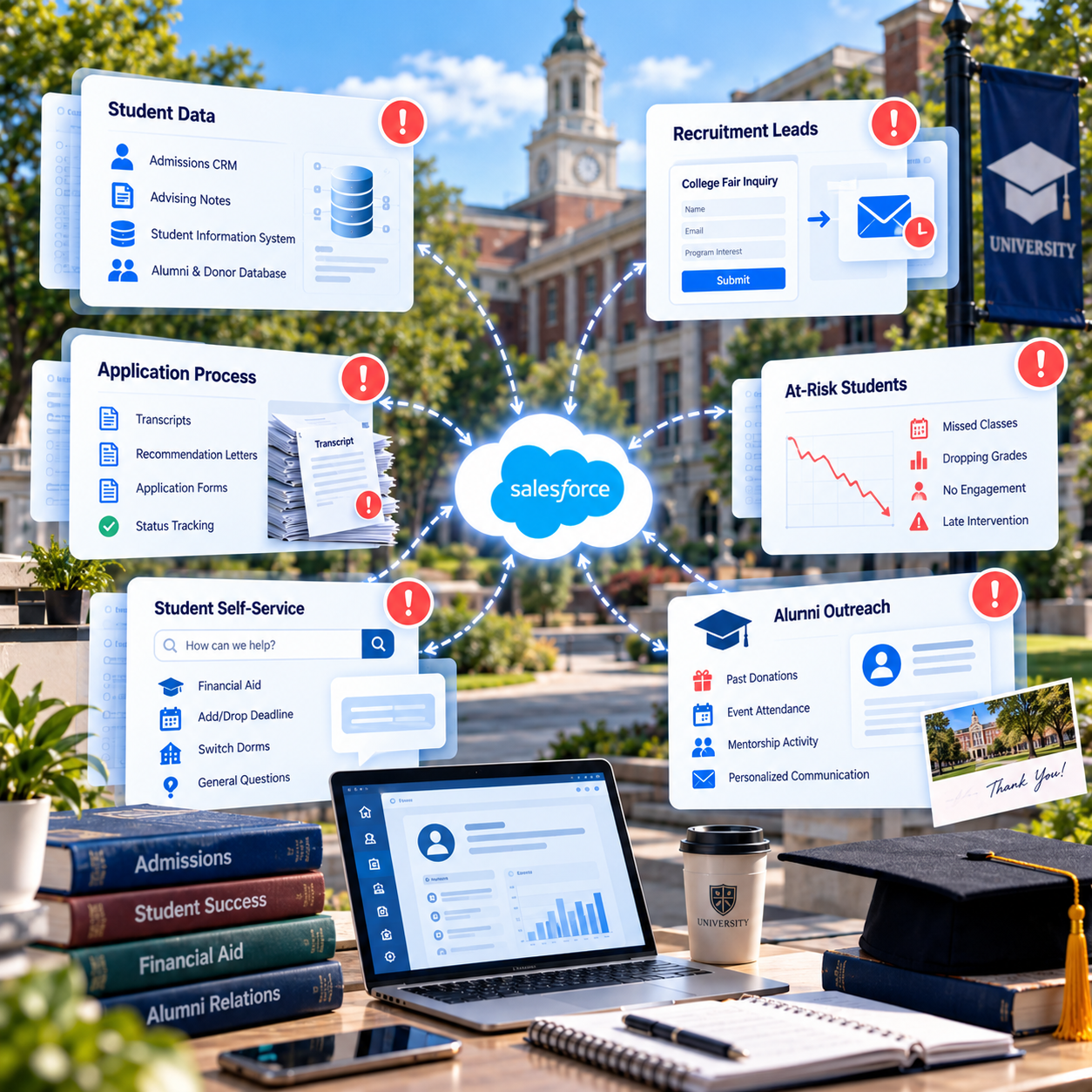
Most colleges we work with have plenty of systems. The trouble is that each office picked its own, years apart, and none of them talk. Here's what that looks like on campus.

Campus systems for student data, recruitment, applications, at-risk students, self-service and alumni outreach connected through Salesforce
  1. Student Data Sits in Separate Offices

    Admissions has its CRM. Advisors take notes somewhere else. The SIS belongs to the registrar, and donors live in a separate database. So a student asks one simple question, and someone ends up checking three systems to answer it.
  2. Recruitment Leads Go Cold

    A student fills out an inquiry form at a college fair. The follow-up email from your team goes out two weeks later, and it's generic. By then she has toured two other campuses and stopped opening your messages.

  3. Applications Stall on Paperwork

    Transcripts arrive by mail. Letters of recommendation get lost in a shared inbox. When applicants call about what's missing, staff have to dig through folders to find out. Complete files sit untouched for days because nobody knows they're ready.

  4. Advisors Spot At-Risk Students Too Late

    In week four, a first-year quietly stops showing up to her chemistry class. Her grades start sliding after that. No one catches it before midterms. When her advisor writes in October, she's halfway through a transfer form.

  5. Students Can't Find Answers on Their Own

    How do I check my aid? When's the add/drop deadline? Can I switch dorms? Three offices get these emails every term and answer them one by one. Replies can take days, and the first week of classes is the worst.

  6. Alumni Outreach Feels Random

    A graduate who donated last year gets the same appeal as someone who never gave. Advancement can't see that she mentored three students or came to homecoming. Gifts get processed by hand, and thank-you notes go out late.

How Stack Sets Up Salesforce Education Cloud

Each problem above has a fix below. Almost all of them start in Salesforce Education Cloud, the Salesforce CRM for higher education. We connect it to your student information system first. Then we add portals, marketing, or Agentforce where they help.

  • One Student Record in Education Cloud

    Admissions, advising, and advancement all open the same student record in Salesforce Education Cloud. Data from your SIS flows in too, whether that's Banner, Workday Student, or PeopleSoft. A staff member answers from one screen and sees only their office's fields.

  • Recruitment and Admissions CRM

    A name collected at a college fair goes into Salesforce Education Cloud right away. So does a web form or a tour sign-up. Marketing Cloud follows up with emails about the student's chosen program. Counselors can see who's reading, and they call those students first.

  • Online Applications and Document Tracking

    We build an application portal on Experience Cloud where students submit forms, transcripts, and letters. If a letter hasn't come in, they see it on their checklist and don't have to call. On your side, a review queue lists every file that's complete and ready.

    Read about Experience Cloud
  • Student Success and Early Alerts

    A professor can flag a student who's missing class in two clicks. Her advisor gets the flag that afternoon and sets up a meeting. The care plan they agree on lives in Education Cloud. Small problems get caught in week four, well before midterms arrive.

  • Student Portals and Agentforce

    A single student portal covers questions about financial aid, registration, and housing. Agentforce agents answer the common ones any time, like a balance check or a deadline. Harder questions get passed to the right office, with the full conversation attached.

  • Alumni Relations and Fundraising

    Gift processing, gift planning, and alumni engagement tools come built into Salesforce Education Cloud. When advancement opens a graduate's record, her donations, event check-ins, and volunteer hours are right there. Appeals get personal, and thank-you notes go out in days.

Start With One Office

Pick the office that's struggling most this term. Maybe admissions is buried, or advisors can't keep up. Book 25 minutes with us. We'll show how Education Cloud could help that team using the systems you have now.

Salesforce Case Studies From the Field

Pick a cloud and see what we built, for whom, and what changed after go-live.

View All

Stack Intelligence Client Testimonials

Clients rate Stack Intelligence 5/5 on Salesforce AppExchange, and these four quotes came in after their projects wrapped.

Our Salesforce Education Cloud Implementation Process

Get a build plan for your campus

Every Education Cloud project we run has seven steps. We start by following one real student through your offices. We don't start a new step until your team approves the last one.

  1. Follow One Student

    We start with one real student your team picks. Her path gets mapped from the day she first inquired to the day she enrolled or graduated. Every office she dealt with gets an interview.

  2. Review Your Current Systems

    We look at your SIS, your admissions tools, and your donor database. If you already have Salesforce, we go through that org and its sharing rules too.

  3. Design the Student Record

    Next comes the data model. We decide how students, applications, programs, advisors, and donors fit together. We agree early on which office can see which fields.

  4. Build in Short Sprints

    Our team works in a sandbox, and your live system isn't touched. Most needs are met by standard Education Cloud features. Custom code is saved for the rest. After each sprint, your staff click through a demo.

  5. Connect the SIS

    Your SIS and other campus systems link up in a test environment first. While that runs, we clean up student and alumni data and do a trial load.

  6. Test With Real Scenarios

    We run a sample inquiry through the system, then an application, an early alert, and a gift. After those pass, your counselors, advisors, and advancement staff test it before launch.

  7. Launch Around the Academic Calendar

    Launch day is set well away from application deadlines and the start of classes. Hypercare follows, and our support continues after that.

Why Colleges and Universities Pick Stack for Salesforce

We start by asking how your campus actually runs. Who owns a student before they enroll? Who gets the alert when grades drop? Which office talks to alumni first? Your answers shape the build.

Hire Salesforce Consultants
  1. 01. Business-First Salesforce Architecture

    We build the data model around your students, programs, and offices. Nothing gets built until the people who'll use it have looked at the design and agreed.

    02. Privacy Planned Early

    Rules like FERPA limit who can see a student's record. We plan sharing settings with your registrar and compliance team before building. By launch, they've already approved them.

  2. 03. SIS and Campus System Integration

    If the SIS and the learning platform disagree on who's enrolled, nobody trusts the data. We connect them first, so every office works from the same student data.

    04. Ready for AI Agents

    Agentforce needs clean student and program data to give good answers. We clean it up while we build. Adding an agent later then takes far less effort.

  3. 05. 50+ Consultants, 150+ Certifications

    Your architects, developers, admins, and analysts all work for Stack. The certified people on our team are the ones who build your org and support it afterward.

    06. Support Beyond Go-Live

    New programs launch and admissions cycles change every year. Our Salesforce managed services keep your org in step with each term and each new class.

    Read about Salesforce managed services

Frequently Asked Questions About Salesforce Education Cloud

Salesforce Education Cloud is the Salesforce CRM for colleges and universities. Each student's record starts at the first inquiry and carries on through graduation and alumni giving. Admissions, advising, and advancement each work in their own part of it.
Salesforce for education refers to the Salesforce products a school uses to work with students, starting with recruiting and carrying on long after graduation. Education Cloud is the core. Outreach runs through Marketing Cloud. Student portals are built on Experience Cloud.

Yes. Salesforce offers Agentforce agents built for schools. Some help prospective students find a program. Advisors can use another to prep for a meeting. A third answers questions about what a student owes. We usually begin with one or two that your data can handle today.

Many colleges use Salesforce as their CRM for higher education. The draw is having one student record that every office can use. An advisor can read what admissions learned and carry on from there.

With Salesforce CRM, higher education admissions offices track every inquiry and application. Advisors check on students whose grades are slipping. Advancement teams plan alumni events and record gifts in the same system. Most schools start with whichever office is struggling most.
Yes. Education Cloud in Salesforce works with common student information systems such as Banner, Workday Student, and PeopleSoft. We use APIs or MuleSoft, depending on your setup. After that, each student's enrollment and courses appear right on their record.
Laws like FERPA in the US govern who can see student records. Inside Salesforce, roles, permission sets, and sharing rules handle access. One wrong setting can expose data, so we set them up with your registrar and compliance team.

Yes. A missed class or a failed quiz can trigger a flag from her professor. The advisor reaches out, they meet, and the plan gets written down. Problems get handled weeks sooner.

Yes. Gift processing, gift planning, and alumni engagement are all part of Education Cloud. An advancement officer can see a graduate's donations, the events they came to, and their volunteer hours together.

There are two parts: licenses and implementation. License prices for Education Cloud are on Salesforce's website. Implementation costs more as you add offices and systems. One admissions team costs less than a campus-wide rollout. We give you a number after discovery.

Timelines vary with where you're starting. A single office on a fresh org is often live within a few months. A full campus rollout with SIS integration and alumni data takes longer. We also plan around your academic calendar, and you get a real timeline after discovery.

Ready To See Every Student in One Place?

Tell us which offices and systems hold student data today. We'll show you how Salesforce Education Cloud would bring it together, with the right access rules from day one.